Translating a scanned document without rebuilding it first
The hours in a scanned job are not in the translating. They are in rebuilding the page so the translation has somewhere to go.
A client sends a birth certificate photographed on a phone, a discharge letter scanned crooked, or a contract that came out of somebody's filing cabinet. The translation is the part you are good at and the part you quoted for. It is not the part that takes the afternoon.
The afternoon goes on rebuilding the page: redrawing the table so translated rows sit under the right headings, fighting tab stops so a signature block lands where it was, retyping a form because there was nothing to type into.
The part nobody quotes for
Ask a translator what a job costs and you hear a rate per word. Ask what a scanned job costs and there is a pause, because the honest answer includes an unpriced hour of layout work that has nothing to do with language.
It goes unpriced because it is unpredictable. A clean one-page letter is ten minutes. A certificate with a stamp across a table, boxes to reproduce and a footer in eight-point type can take most of a morning, and you cannot tell which you have until you open the file. So it gets absorbed, and the real rate on scanned work sits well below the rate on documents that arrive as Word files.
Sworn and certified work makes it worse, because there the layout is not cosmetic. If the original has a table, the translation is expected to have that table. You are not free to deliver a clean wall of text and call the formatting somebody else's problem.
Why the usual tools do not help
Most translators have tried the obvious things. They disappoint in two different ways, and it is worth being precise about which.
Converters hand back either a picture of the page in a Word wrapper, which you cannot type into at all, or a document where every line floats in its own box. The second looks right until you change a word. Then nothing moves out of the way, because there are no paragraphs and no table, only fragments pinned where the ink used to be. For a translator that is the worst possible output, since replacing the text is the whole job.
General AI assistants read documents well and will give you a translation. What comes back is a fresh document in whatever shape the assistant felt like, not yours. Tables get rebuilt with every cell the same height, a one-page form becomes two, checkboxes turn into square brackets. The words are often fine. The page is gone.
The longer version of that argument, with one document run through four tools, is in why your PDF to Word conversion came out broken.
This is the problem we started with
We did not build a general document tool that translators happen to use. We built this because this job was being done by hand: the client sends a scan, the translator spends an hour making something to translate into, then does the work they were hired for.
So the goal was never to read the characters accurately, which is solved and is not what costs you the afternoon. It was to hand back a document rather than a transcript. Headings that are headings, paragraphs that reflow when you type into them, tables with real cells you can tab through. A file a person could have made, so you start translating in the first minute instead of the sixtieth.
What comes back
You upload the scan and pick one of two things. Either the document in its original language, cleaned up and editable, and you translate it yourself as usual. Or the same document already translated with the layout kept, and you post-edit rather than retype.
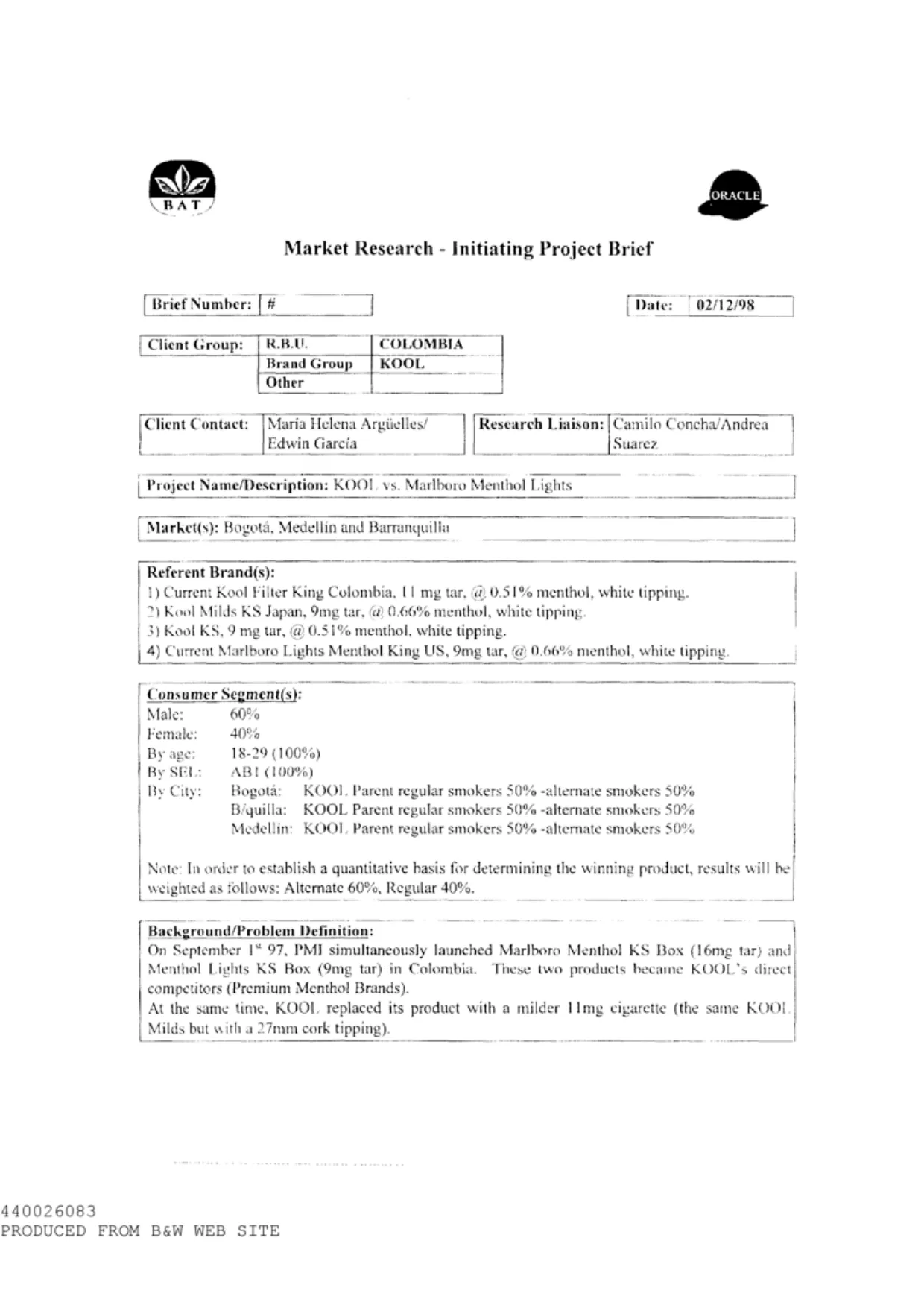
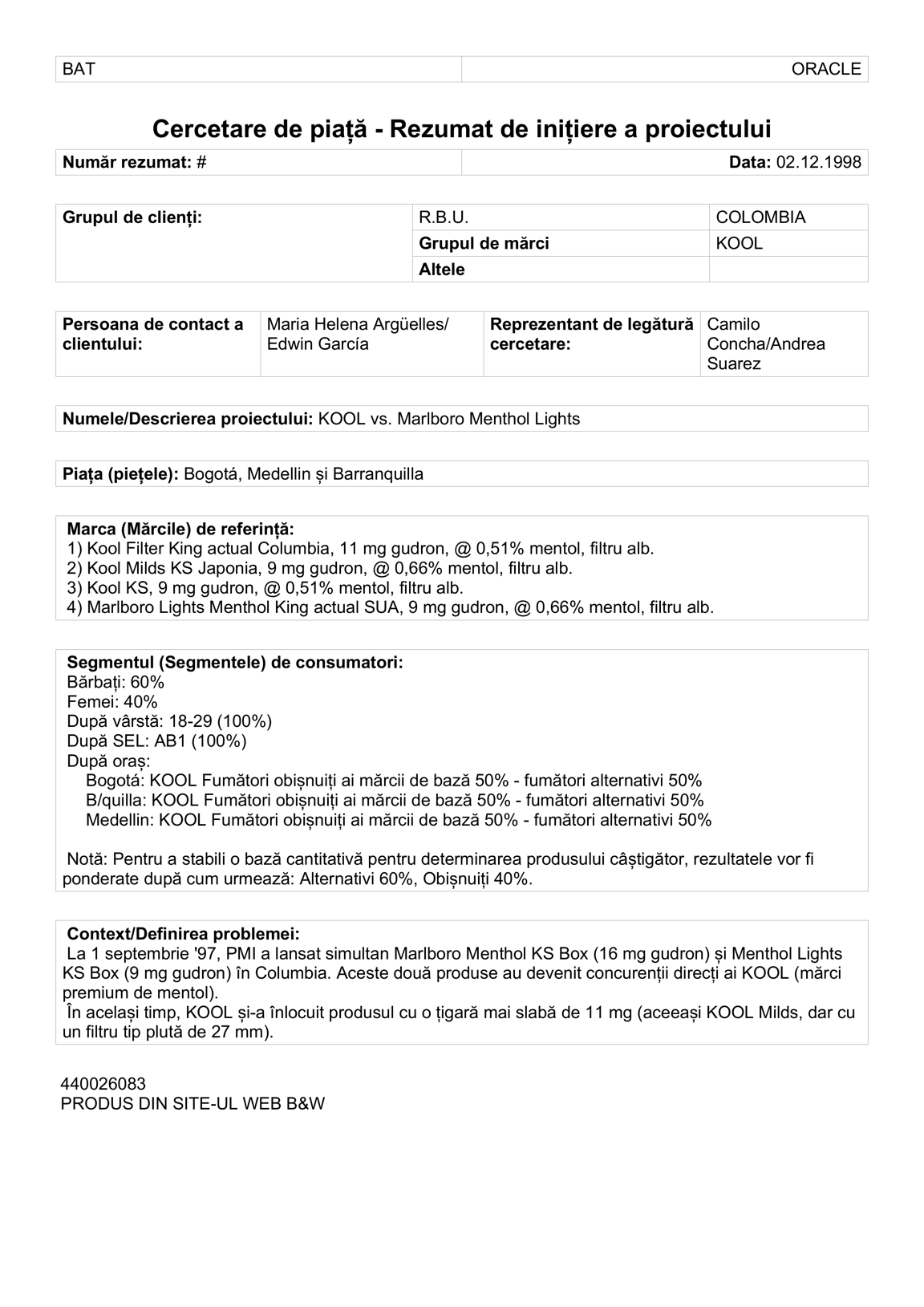
Either way you get an ordinary Word file. It opens in Word, Google Docs and LibreOffice, it is what clients expect to receive, and it is a format every translation tool imports if you prefer to work in one.
Thirty-five languages are supported, covering the European ones people ask for most. Scripts that read right to left, and languages written without spaces between words, are not supported yet. We would rather say so than let you find out on a live job.
We say the layout is preserved rather than perfect, and the wording is deliberate. On a good scan the result is close enough that you would not immediately know. On a photograph taken at an angle in poor light it will not be, and no tool will make it so. A promise that fails on the hard documents is worth nothing on the easy ones.
Dates come back exactly as printed
A small thing that matters more than it sounds, and the clearest sign of a tool built for translators rather than adapted for them.
Nothing reading a document can know whether 04/07/2026 is the fourth of July or the seventh of April. The page does not say. Most tools guess, usually by assuming whichever convention their developers grew up with, and a guess on a date in a medical record or a court document is not a formatting preference. It is a mistranslation with consequences.
So we do not reformat dates. They come back written the way they were written, in the order they were written, and the decision stays with you, because you can read the rest of the document and tell. Month names are translated normally. The one convention we apply is Romanian, where numeric dates take full stops, and even there the day and month order is left alone.
Getting a good result
- Flat beats sharp. A slightly soft photo taken square-on reads far better than a crisp one at an angle, because a skewed table makes the columns cross. Worth one line in your intake email.
- Check the last page first. Any tool of this kind degrades over a long document, and page nine is where nobody looks.
- Check the widest table, one row end to end. Tables are where structure is hardest and where an error hides best.
- Type a sentence into a paragraph before you commit. If the text after it moves down, you have a real document. If not, you have boxes.
An editing workspace, in early access
A translated document is a good starting point, but for a lot of work the real need is somewhere to do the post-editing with the original in front of you.
We are testing exactly that with a small number of translators: source and translation side by side, line by line, so you work through a document without scrolling between two windows and without losing the layout on the way out. It also keeps a record of translations you have approved, so on the next certificate of the same kind the lines you already settled come back in your own wording rather than as a fresh machine attempt. On repetitive document types, which is most sworn work, that is where the time goes.
The editing workspace on a real document: source on one side, editable translation on the other, with the original page visible. Anonymise any client details.
It is genuinely early and it is not on any plan yet. We would rather show it to people who do this work daily than guess at what it needs, so if that is you and you want access, say so and we will set it up. What gets built on top of it will be decided by what those translators tell us is missing.
Try it on your worst scan
The useful next step is not reading more about it. Take the worst scan currently in your inbox and see what comes back. Signing up gives you enough free credit for a few real pages, and your own documents are the only test that means anything. There are more real examples, including scans that came back translated, on the samples page.
Try it on your own document
30 free tokens when you sign up, no card needed.