Convert PDF to Word (DOCX), layout included
Scans, photos and filled-in forms come back as a Word file you can edit, without losing the formatting: the tables are still tables.
- Real Word tables, not floating text boxes
- Scans, phone photos and hand-filled forms
- One page free, and nothing is stored
One page free without an account. Need more?Start free
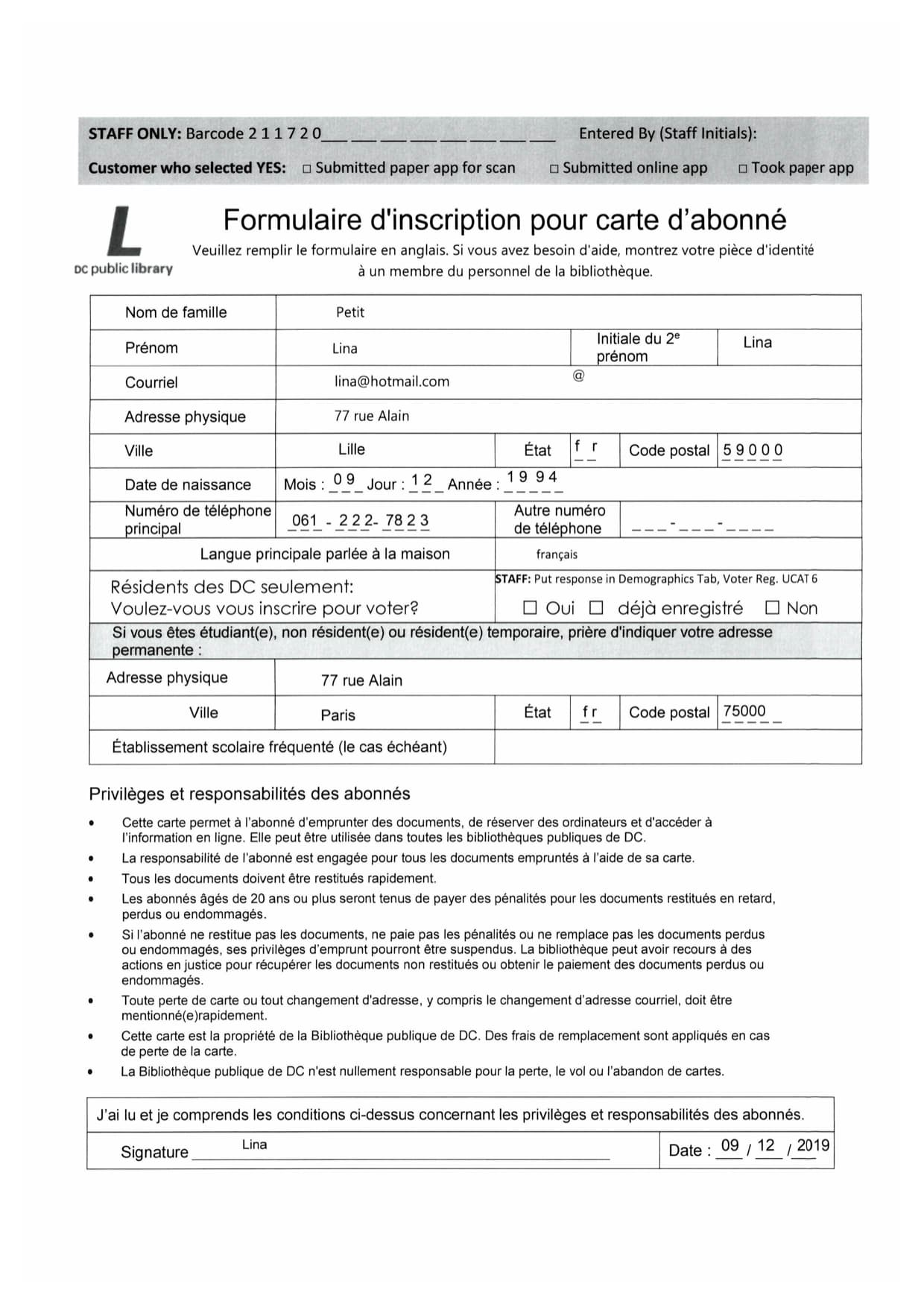
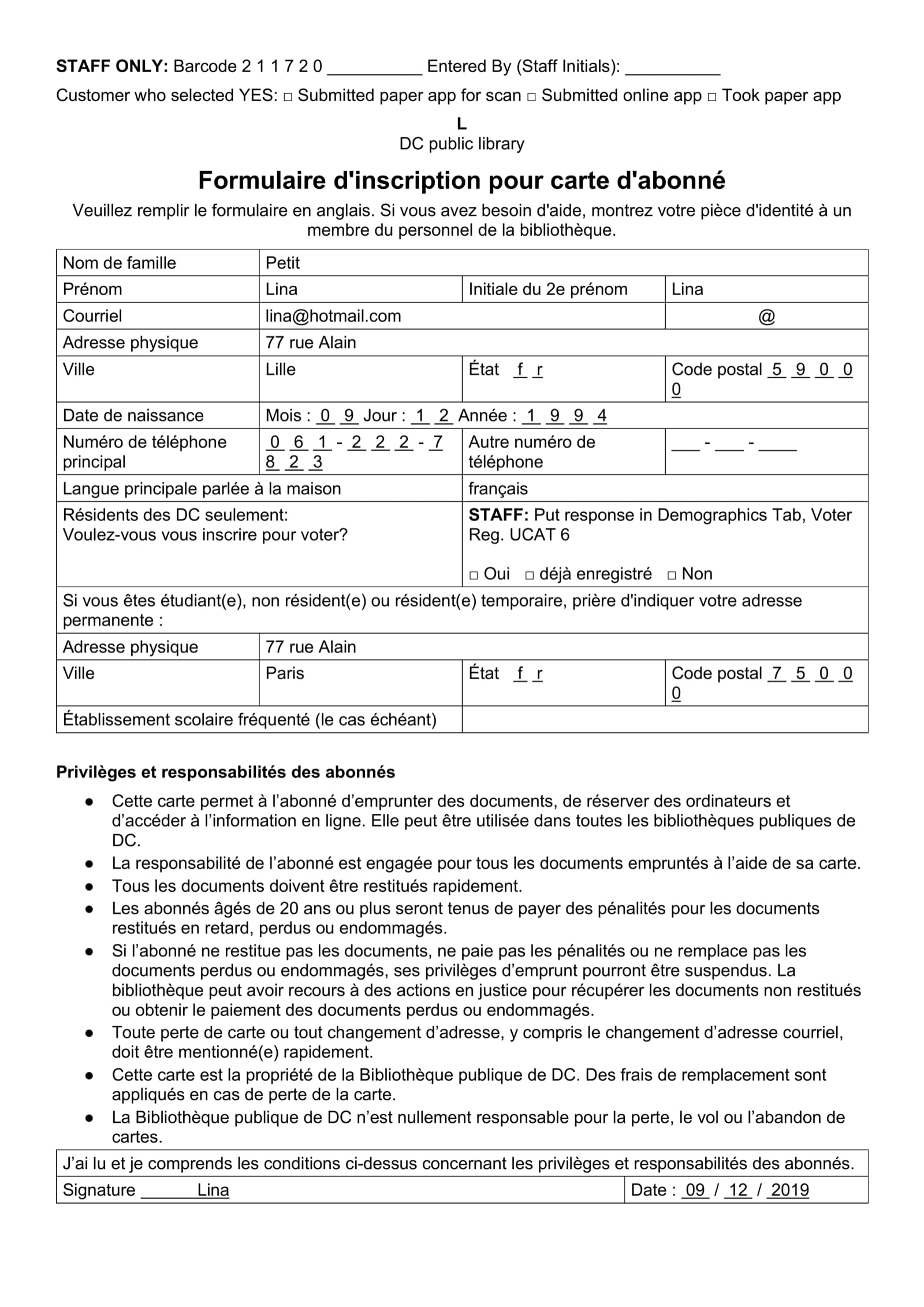
Real PDFs, and the Word files they produced
Every one of these came out of the product. Pick a document like yours and compare the scan against the DOCX it returned.
Why PDF to Word conversions lose the formatting
A PDF has no paragraphs, tables or columns in it, only text placed at points on a page, and a scan does not even have the text. A converter has to guess the structure back, and most guess badly in one of three ways: a picture of the page, text scattered across floating boxes that fall apart when you type, or a straight read across the page that interleaves two columns and turns a table into a list of numbers. The words can be right while the document is lost.
We rebuild the page's structure, not just its words. A table comes back as a Word table with its rows and columns, a two-column page keeps its two columns, headings keep their weight, and a form keeps each value beside its label. What you open is a document you can edit, not one you have to rebuild before you can start.
Editable DOCX, not a picture
Open it in Word, Google Docs or LibreOffice and type. Nothing is a locked image or a floating text box.
The formatting survives
A table in the PDF comes back as a real Word table with its rows and columns, and headings and columns stay where they were. That is where most converters give up.
Scanned PDFs to Word too
A phone photo or a flatbed scan works the same way as a born-digital PDF, including handwriting on forms.
Before you ask
What can it do?
Two things. It rebuilds a PDF as an editable Word document with the layout intact, or it pulls the specific fields and tables you name into Excel, JSON or Word.
Does it work on scanned PDFs?
Yes. Scans are what it is built for. A photographed or scanned page goes through OCR and comes back as text you can edit, with the page still laid out the way it was. Read the guide.
How do I convert a scanned PDF to Word?
Upload it and download the Word file. Each page is read and rebuilt with its headings, columns and tables, and you get back a .docx you can edit. One page is free with no account.
Will my tables survive?
Yes, as real Word tables with rows and columns you can edit, not a picture of a table and not a stack of floating text boxes.
Can you translate it as well?
Yes, in the same run. The translation lands in the same structure as the original, so you get a translated document rather than a translated wall of text.
Does it read handwriting?
Yes, handwritten pages are supported.
Is the output real text, or a picture of text?
Real text. Every word can be edited, searched, copied and run through a spellchecker, the same as anything you typed yourself.
What does a page cost?
Document conversions start at 9p a page and data extraction starts at 22p a page. The price of a token falls as the plan gets bigger.
Which languages does it work with?
33 languages written left to right, most of them European, including English, French, German, Spanish, Polish, Romanian, Italian and Dutch. Chinese, Japanese and Arabic are not supported yet.
Can I try it before paying?
Yes. You get 50 free tokens when you sign up, no card needed, which is enough to run a few real documents through and see what comes back.
Do I need a subscription?
No. A subscription works out cheaper per page, but you can buy tokens as you go and use them whenever.
Do unused tokens expire?
Monthly allowance rolls over one month, so a slow month is never wasted. Purchased top-ups do not expire.
Are my files saved?
Your original document is deleted as soon as the job finishes. The result is kept for 10 minutes by default, and you choose how long that window is in your settings.
Are my documents used to train AI models?
No. Nothing you upload is used to train anything, ours or anyone else's.
Why does PDF to Word usually wreck the formatting?
Because most converters read the characters first and treat the layout as an afterthought. Columns, tables and headings are a separate problem from the letters, and a tool that solves only the letters hands you a wall of text to rebuild.
Why pay, when other converters are cheaper?
You might save a few pence on the file. You will lose hours putting the formatting back. The saving is your time, not the processing.
Why not just use a generic AI assistant?
When a generic assistant has finished with your file, you still have work to do. It reads a document well and hands back text. We hand back the document, laid out the way it arrived, so you are closer to finished. See for yourself.
Try it on your own document
50 free tokens when you sign up, enough for a few documents before you decide anything.