How to get structured data out of your PDFs
A document shows you the data. It does not hand it over. Here is how to get it into a spreadsheet without retyping, and how to know the result is right.
If you handle documents in volume, you already know the job this is about. Ninety supplier invoices, or a year of bank statements a client sent as scans, or four hundred lab reports that need to be one sheet before anyone can see a pattern in them.
You can read every number on every page. You cannot sort them, total them or filter them. So somebody types them into a spreadsheet, one line at a time. This is about how to extract data from scanned documents without that step.
Why a PDF will not just become a spreadsheet
A PDF describes how a page should look. It knows where to put ink so your eye sees a table. It does not know the table has rows, that one column is money, or that the figure at the bottom is the sum of the ones above it.
That structure exists in your head while you read, and nowhere in the file. Which is why copying out of a PDF fails the way it does: paste a table into a spreadsheet and you get one column of everything, or columns that hold for eleven rows and then slip because a description wrapped onto a second line.
What you get back
You tell us once what matters on this kind of document. Then you hand over the folder and get a spreadsheet.
There are two shapes people want. Sometimes you only need to extract fields from a PDF and nothing else: the closing balance and period from every statement, the supplier and total from every invoice, one line per file. Sometimes the table on the page is the point, and you want every transaction, every billed item, every test result as its own row. Plenty of jobs need both.
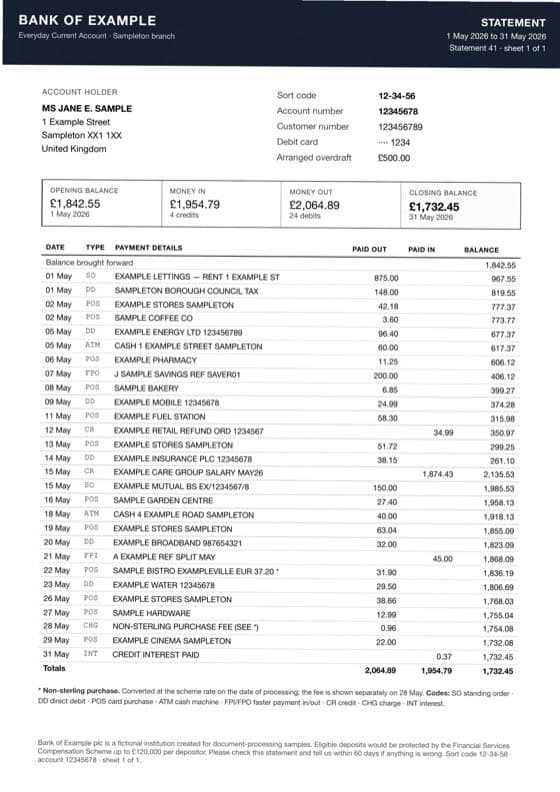
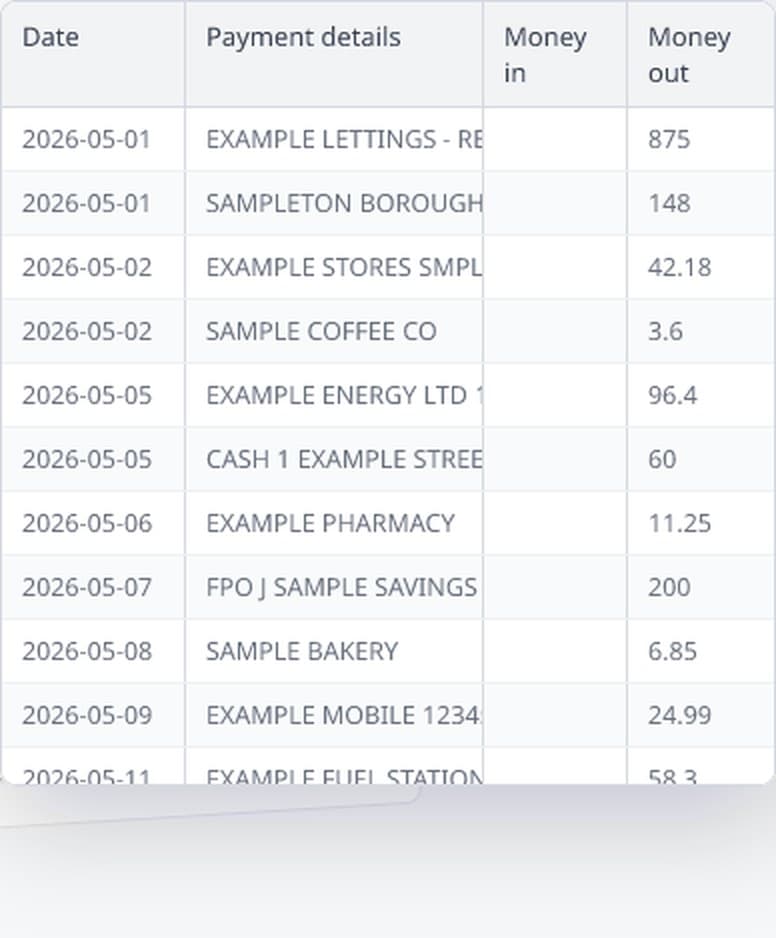
You describe what you want in your own words, not by drawing boxes on a page. That is the difference that matters: because you described what a value is rather than where it sits, the same description works across documents from different senders, in different layouts and different languages. Ninety invoices in ninety layouts is one job, not ninety.
Nothing gets invented along the way. If a value is not printed on the document, the cell is left empty and flagged rather than filled with something plausible. An empty cell you can see is worth a great deal more than a confident guess you cannot.
Who uses this, and for what
The pattern is always the same. Some document arrives regularly, in volume, from people who will not change how they produce it, and a handful of values on it are needed in a sheet.
- Bookkeeping and accounts. Line items off purchase invoices to code a ledger, and transactions off statements for periods a client can no longer export. There is a piece on invoices and receipts in particular.
- Lending and mortgages. Six or twelve months of statements per applicant, where the job is finding the income lines.
- Clinics and research. Results off lab reports, where the same tests appear on every page in a different house style per laboratory.
- Applications and claims. Form data extraction from application forms, claim forms and onboarding packs that arrive as scans, where the same handful of boxes has to be read off every one.
- Property and insurance. Readings, charges and dates off statements, certificates, adjuster reports and repair invoices.
- Everyday back office. Delivery notes, receipts and remittance advices turned into a sheet somebody else reconciles.
Notice what those have in common. The documents come from outside the organisation, which is why the sensible advice to just ask the sender for a spreadsheet does not survive contact with the week. The bank does not offer one going back far enough. The client sends scans because that is all they have.
What about the tools you have already tried?
Most people arrive at document data extraction having already tried something. It is worth saying where each one runs out rather than pretending they are all useless.
Free online converters do a reasonable job on a clean digital file with ruled borders. Give one a scan and you get a picture in a spreadsheet-shaped wrapper. They also have no idea what you were after: you get whatever was on the page, not the six things you needed.
Cloud text-recognition services are accurate, cheap, and components rather than products. They hand back the words and leave you to build the thing that turns those into your six fields, then maintain it. Sensible with engineers and thousands of documents a day. Not something an accountant does on a Tuesday.
Enterprise document platforms do solve the whole problem, along with a lot you did not ask for, and are priced to match: annual contract, minimum spend, implementation project. Worth it at tens of thousands of invoices a month. For a folder of two hundred, the overhead is the product.
General AI assistants read documents well, and for one question about one file they are often the quickest answer there is. What they do not offer is repeatability. Ask again next week and the columns come back in a different order, there is no way to run a folder through, and nothing is checking the answer.
How do you know it is right?
This is the part that matters most and gets written about least. The failure that costs money is never the garbled line, because you can see a garbled line. It is the row quietly dropped where a page broke, or a figure that landed one column across.
Those produce a spreadsheet that looks perfectly reasonable and is wrong, and you find out weeks later when something does not tie.
Many documents can catch that themselves, because they state arithmetic that has to hold. On a bank statement, the opening balance plus everything paid in, less everything paid out, has to reach the closing balance. If a transaction went missing, that stops working. We check it before you see the result and tell you when it does not agree. Invoices get the same treatment against their own totals.
A result where a check has failed: the warning naming what did not agree, and the two figures that disagree. From a real run if possible.
What changes is not the checking, but how much of it there is. Reading a retyped page against its source scales with the length of the document. Looking at a result that has already tested itself is a much smaller job, because you only examine the places it could still plausibly be wrong.
The whole folder, not one file at a time
A year of statements is twelve files and ninety invoices is ninety. You add the folder and get one spreadsheet back, with every row carrying the file it came from, so you can still tell March from April without opening anything.
The documents do not have to match each other either. Different banks, different currencies, different languages, scans mixed with clean digital files. It is one pile, because what you described is what the documents contain rather than where it sits on the page.
Try it on your worst document
Use the crumpled scan from the supplier who still faxes, not your cleanest file. The clean ones work everywhere and tell you nothing. Signing up gives you enough free credit to run a few real pages, and your own documents are the only benchmark that means anything.
There are real documents and what came back from them on the samples page. If bank statements are your case in particular, the guide to those follows one from scan to spreadsheet.
Try it on your own document
30 free tokens when you sign up, no card needed.